
Core idea
ERP is the operational system of record. AI gets interesting when it can reason over that record.
Big shift
The move is from static reports to role-aware answers, summaries, alerts, and workflow actions.
Why Microsoft
Dynamics 365 lives close to Microsoft 365, Graph, Power Platform, Azure, Teams, and Copilot.
ERP, AI, and why Dynamics 365 is becoming a serious center of gravity
ERP stands for Enterprise Resource Planning, which is a deeply boring name for one of the most important systems inside a business.
At its core, an ERP is the operational backbone that keeps track of how a company actually runs: finance, purchasing, inventory, manufacturing, projects, HR, supply chain, billing, reporting, and sometimes customer-facing work too.
The easiest way to think about ERP is this:
ERP in one sentence
If CRM knows who the customer is, ERP knows what was sold, what it cost, whether it shipped, whether it was invoiced, whether the invoice was paid, and how all of that changed the books.
That matters because most companies do not fail from lack of data. They fail because the data is scattered everywhere. Finance has one view. Operations has another. Sales has a third. Leadership gets a dashboard that is technically "real time" but still somehow feels three weeks late.
ERP is supposed to pull those threads into one operational model.
What an ERP actually brings together
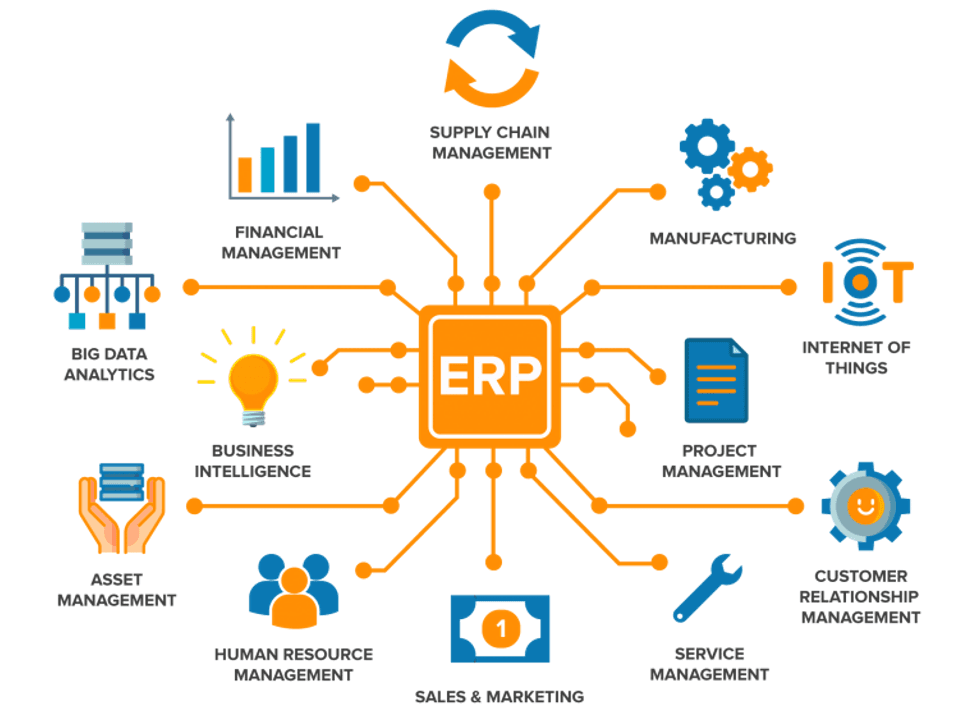
The promise of ERP is not just "one database." That is the marketing version. The more useful version is one shared operating model.
That model usually includes:
- finance and general ledger
- accounts payable and accounts receivable
- purchasing and procurement
- inventory and warehouse operations
- manufacturing and production planning
- supply chain and demand forecasting
- projects, time, billing, and utilization
- HR, payroll, or workforce operations
- customer orders, service, and fulfillment
- reporting, controls, and compliance
This is why ERP implementations are rarely casual little IT projects. They touch how people work, how money moves, how orders flow, and how leadership measures the business.
When an ERP is healthy, people trust the numbers. When it is messy, everyone builds side spreadsheets to protect themselves from the system. That is usually the first warning sign.
A few of the popular ERP platforms
There are a lot of ERP systems, but a few names show up constantly.
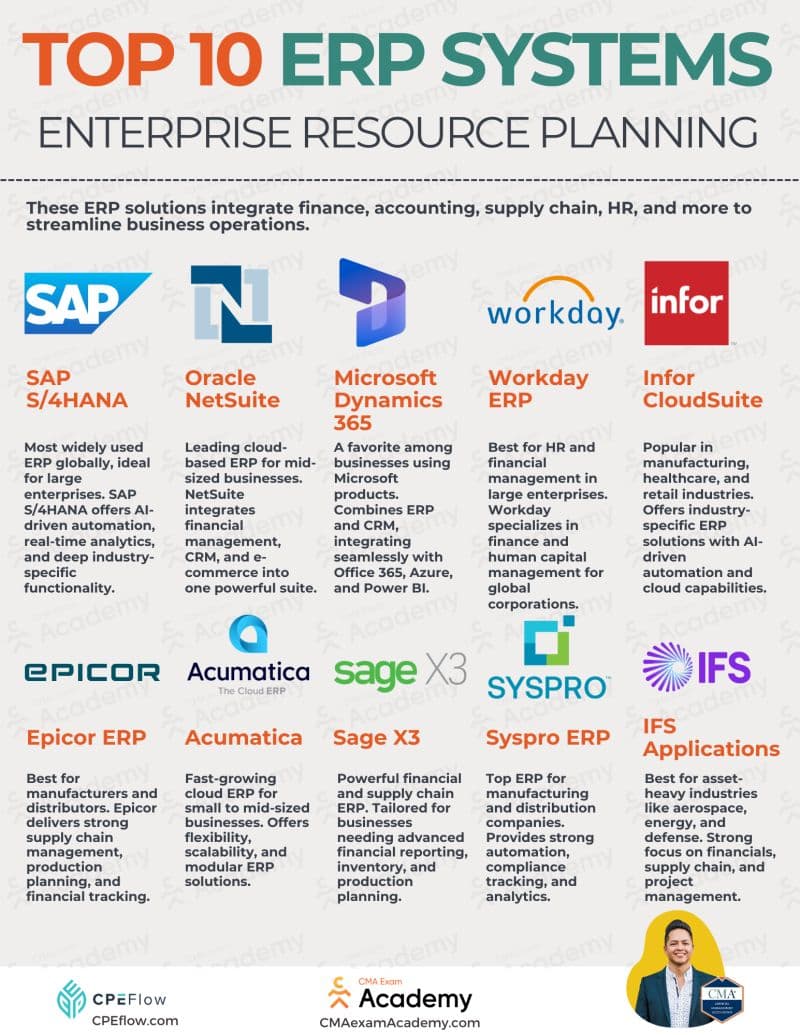
SAP S/4HANA is common in large global enterprises with complex finance, manufacturing, supply chain, and compliance needs. SAP is powerful and mature, but the implementation effort can be heavy.
Oracle Fusion Cloud ERP is also aimed at larger organizations and is strong in finance, procurement, planning, and enterprise operations. Oracle tends to be a serious contender when a business already lives in the Oracle ecosystem.
NetSuite, owned by Oracle, is popular with mid-market companies that want cloud ERP without the full weight of a massive enterprise implementation. It is often used by growing companies that need financials, inventory, subscriptions, commerce, or multi-entity operations.
Workday is especially known for HR and financial management in larger organizations. It often shows up where workforce planning, human capital management, and finance need to live close together.
Infor, Epicor, Acumatica, Sage, IFS, and Odoo each have strengths depending on industry, budget, geography, and operational complexity. Manufacturing, distribution, professional services, field service, construction, retail, and public sector can all push companies toward different ERP choices.
Then there is Microsoft Dynamics 365.
Dynamics is where the AI conversation gets especially interesting, because it does not sit alone. It connects naturally with Microsoft 365, Teams, Outlook, SharePoint, Power Platform, Azure, Microsoft Graph, and Copilot.
Why Dynamics 365 deserves a closer look
Dynamics 365 is not one single product. It is a family of business applications.
On the ERP side, the big pieces include:
- Dynamics 365 Finance
- Dynamics 365 Supply Chain Management
- Dynamics 365 Business Central
- Dynamics 365 Commerce
- Dynamics 365 Human Resources
- Dynamics 365 Project Operations
Microsoft also has CRM-style apps like Sales, Customer Service, Field Service, and Customer Insights. That matters because Dynamics can cover both the back office and a lot of the front office.
The real advantage is not just the app list. It is the surrounding platform.
Microsoft business stack
Dynamics 365
Operational records: customers, vendors, invoices, orders, inventory, projects, cases, and financial transactions.
Microsoft Graph
Productivity context: users, groups, Teams, Outlook, SharePoint, files, meetings, calendars, and permissions.
Power Platform
Apps, dashboards, automations, approvals, custom forms, and low-code workflow glue.
Copilot and agents
Natural-language interaction, summaries, guided workflows, retrieval, and actions over business data.
This is important because AI becomes much more useful when it can see across the business instead of staring at one isolated system.
A normal ERP report might answer:
What invoices are overdue?
An AI-connected ERP environment can start answering better questions:
- Which overdue invoices are tied to our highest-risk customers?
- Which purchase orders are likely to delay active projects?
- Which sales commitments are not supported by inventory or production capacity?
- What changed in this account since the last leadership review?
- Summarize this customer across email, Teams, invoices, support tickets, and open orders.
That shift is the real story.
AI is not just a chatbot bolted onto an ERP. The valuable version is an intelligence layer that can reason across ERP data, documents, communications, workflows, and permissions.
The useful architecture, without the buzzword fog
The goal is not to replace ERP with AI. That is mostly nonsense.
The useful architecture is more like this:
- Dynamics 365 remains the system of record.
- Microsoft Graph connects the productivity layer around it.
- Copilot connectors bring external or custom data into Microsoft Search and Graph-grounded experiences.
- Copilot Studio lets teams build role-specific agents.
- Power Automate and plugins let agents trigger real workflows.
- Security trimming keeps answers aligned with what the user is allowed to see.
The practical version
The win is not "ask AI anything." The win is asking a business question and getting an answer grounded in the systems, files, people, conversations, and permissions that already define how the company works.
Here is the shape in a more practical stack:
Dynamics 365
Operational truth: invoices, vendors, purchase orders, forecasts, stock, customers, and financial records.
Microsoft Graph
Work context: Teams chats, Outlook emails, SharePoint docs, calendars, meetings, users, and permissions.
Copilot connectors
Indexed external and custom data: policies, contracts, legacy systems, internal portals, and specialty tools.
Copilot Studio
Custom agents and actions: finance close assistants, project risk agents, service triage, and supply chain copilots.
Power Platform
Workflow execution: approvals, notifications, forms, exception queues, and automations.
Azure
Deeper integration and governance: APIs, identity, data services, monitoring, logging, and security controls.
That architecture is boring in the right way. The ERP still owns the financial and operational facts. AI helps people find, summarize, explain, compare, and act on those facts faster.
What Microsoft Graph adds
Microsoft Graph is the connective tissue across Microsoft 365. It represents relationships between users, groups, Teams, Outlook, SharePoint, OneDrive, calendars, files, meetings, and organizational activity.
That matters because business context rarely lives in one place.
An ERP may know that a vendor shipment is late. Outlook may have the email where the vendor explained why. Teams may have the internal conversation where operations discussed the workaround. SharePoint may have the contract. Power BI may show the margin impact. A project plan may show the customer deadline.
AI becomes useful when it can pull those pieces together.
Example prompt
"Give me a risk summary for our top five open customer projects. Include overdue invoices, delayed purchase orders, recent account emails, and any Teams discussions from the delivery leads this week."
That is not magic. It requires clean permissions, good connectors, reliable data models, and thoughtful agent design. But the value is obvious: people get a joined-up answer instead of opening eight tabs and pretending that is strategy.
Where Copilot and Copilot Studio fit
Microsoft 365 Copilot is the broad AI assistant across Microsoft 365. It can work with Graph-grounded context from email, Teams, documents, meetings, and more.
Dynamics 365 Copilot features bring AI into specific business workflows, like sales summaries, service responses, finance insights, supply chain assistance, and customer interactions.
Copilot Studio is where things get more custom. It lets a company build agents around specific tasks, knowledge sources, topics, actions, and workflows.
That opens the door to role-based business agents:
- a finance close agent that explains variances, pulls supporting documents, and starts approval flows
- a collections agent that summarizes customer history before drafting a payment follow-up
- a supply chain agent that watches for late vendors, stockouts, and demand changes
- a project operations agent that connects budgets, time entries, invoices, milestones, and team communications
- an executive briefing agent that turns operational noise into a daily readout
The best agents are not generic. They have a job.
Agent design rule
If an agent cannot name the workflow it improves, the data it needs, the people it serves, and the actions it can safely take, it is probably just a demo wearing a business costume.
What an AI-driven ERP workflow could look like
This is where the conversation stops being "chat with your data" and starts becoming business process orchestration.
Imagine a customer places an order through a portal, a salesperson, or an EDI feed. In a traditional workflow, that order might bounce between sales, inventory, operations, purchasing, finance, and shipping before anyone has a full picture.
In an AI-connected Dynamics 365 environment, the agent does not replace those systems. It watches the flow across them.
Example flow
1. Order comes in
The agent reads the order, matches it to the customer, checks credit status, contract terms, pricing rules, and any recent account notes.
2. Inventory and fulfillment get checked
It checks available stock, committed inventory, open purchase orders, warehouse capacity, and delivery timing before anyone promises a date.
3. Exceptions get routed
If stock is short or margin looks wrong, it opens an exception, summarizes the issue, suggests options, and sends the right manager an approval request.
4. Approved actions happen
Once approved, Power Automate can reserve inventory, create a pick request, notify the warehouse, draft a customer update, or trigger a purchase order for replenishment.
5. The agent keeps watching
It monitors the pick, shipment, carrier update, invoice status, and customer communications, then flags delays before the customer has to chase anyone.
The important part is the approval boundary. The agent can gather context, prepare the decision, trigger safe actions, and keep the workflow moving. But when the action changes money, inventory, customer commitments, or financial records, the business can require human approval.
That is the useful middle ground: not "AI runs the company," and not "AI writes a cute summary while people still do all the tab-hopping." It is AI supervising the handoffs, surfacing exceptions, and executing the boring parts once the right person signs off.
The most useful ERP + AI use cases
The first wave of useful ERP AI will probably be less glamorous than people expect. That is fine. Boring workflows are where the money leaks.
Finance
- summarize close status across entities
- explain budget variance in plain language
- identify unusual transactions or missing support
- draft collection notes based on customer history
- answer policy questions from internal finance docs
Operations and supply chain
- detect purchase orders that threaten delivery dates
- summarize vendor performance from ERP records and email threads
- compare inventory levels against demand signals
- surface production or fulfillment bottlenecks
- recommend escalation paths based on customer impact
Sales and account management
- summarize account health across CRM, ERP, support, email, and meetings
- flag deals that conflict with inventory, production, or credit status
- generate renewal or QBR prep briefs
- explain why an account is profitable or painful
- connect promised work to actual delivery capacity
Projects and services
- compare budget, time, invoices, milestones, and open risks
- identify scope creep from project notes and billing patterns
- summarize delivery status from Teams, project plans, and ERP
- draft customer updates grounded in actual project data
This is not about making employees type fewer words into a chat box. It is about reducing the amount of time spent hunting for context.
The catch: AI will expose bad ERP hygiene fast
AI does not magically fix messy systems. In some cases, it makes the mess more visible.
If vendor names are inconsistent, roles are sloppy, permissions are too broad, documents are outdated, or teams do not trust ERP records, Copilot will inherit that chaos.
Before going too hard on AI, companies need to care about:
- identity and access control
- data ownership
- field consistency
- document lifecycle management
- source-of-truth decisions
- auditability
- workflow boundaries
- human review for sensitive actions
That last part matters. Let AI summarize freely. Let it draft carefully. Let it recommend with context. Be more cautious when it can approve, post, pay, delete, or modify records.
Do not skip governance
AI around ERP is powerful because it sits close to money, operations, and customers. That is exactly why permissions, audit trails, and workflow limits are not optional plumbing.
So where should a company start?
Start with one workflow where context is painful and the risk is manageable.
Good first targets:
- account briefing
- invoice collection prep
- purchase order delay summaries
- project status summaries
- policy Q&A over internal documents
- finance close task tracking
- customer service knowledge retrieval
Bad first targets:
- fully autonomous payments
- automatic journal entries without review
- broad "ask the company anything" bots with unclear data boundaries
- agents that can change production records before anyone trusts them
The smartest path is usually:
- Connect trusted knowledge sources.
- Ground answers in real business records.
- Keep permissions strict.
- Start with summaries and recommendations.
- Add workflow actions once people trust the outputs.
- Measure whether the agent actually saves time or reduces errors.
Final thought
ERP has always been about pulling the business into one operational picture. AI does not change that goal. It changes the interface.
Instead of forcing people to know which report, menu, table, dashboard, folder, channel, and email thread holds the answer, AI can help bring the answer to them.
Dynamics 365 is interesting because Microsoft already owns so much of the surrounding work surface: the ERP, the documents, the inbox, the meetings, the chats, the identity layer, the low-code workflow layer, and now the Copilot layer.
That does not make it automatic. It does make the opportunity very real.
The companies that get this right will not be the ones that "add AI" to ERP. They will be the ones that use AI to make the ERP, the workplace, and the business context finally feel connected.
Short version
ERP gives the business a system of record. Dynamics 365 plus Graph, Power Platform, and Copilot can turn that record into a system of context.